SuperScript
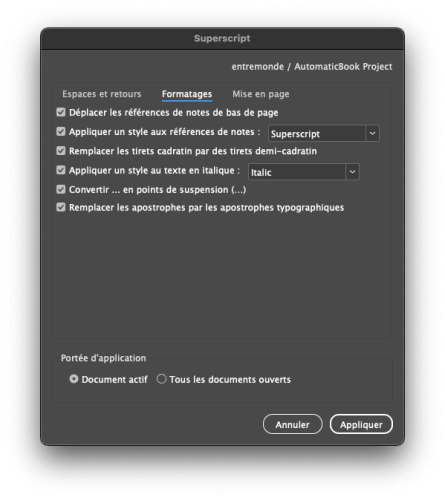 SuperScript is an InDesign script designed to automate typographic corrections in layout documents. It precisely applies the rules of French typography — space management, punctuation correction, quotation mark handling, apostrophe replacement, removal of double line breaks, and more — while respecting editorial nuances. The script also handles footnotes intelligently: it moves footnote references before punctuation and automatically applies a defined style, avoiding common mistakes and tedious manual edits.
SuperScript's interface is organized into four clear tabs (“Spaces and Breaks”, “Styles”, “Formatting”, “Layout”), allowing precise control over which corrections to apply, whether to a single document or a batch. It also allows for automation of certain layout rules, such as conditional style application or inserting master pages on the last page of a chapter. Its modular structure and robust error handling make it a reliable, fast tool perfectly suited to editorial production.
User Interface
The SuperScript interface is divided into four clear tabs:
- Spaces and Breaks: Options for fixing spaces and line breaks
- Styles: Options for applying and defining character styles
- Formatting: Options for various typographic corrections
- Layout: Options for conditional style and master page application
Key Features
Typographic Correction
- Removal of spaces before single punctuation marks
- Typographic space correction around double punctuation and quotation marks
- Replacement of straight apostrophes with typographic apostrophes
- Conversion of ellipses
- Replacement of em dashes with en dashes
Footnote Handling
- Smart repositioning of footnote references before punctuation
- Automatic application of a style to footnote references
- Preservation of tabs in footnote text
Advanced Number Formatting
- Addition of non-breaking spaces between thousands (12345 → 12 345)
- Replacement of decimal points with commas (3.14 → 3,14)
- Option to exclude years from number formatting
Formatting of Centuries and Ordinal Expressions
- Automatic formatting of centuries (14th century → XIVe siècle)
- Formatting of ordinal expressions (2nd International → IIe Internationale)
- Processing of work references and proper names (Volume III, Louis XIV)
- Insertion of non-breaking spaces in bibliographic references
Conditional Style Application
- Apply a specific paragraph style after a “trigger” style
- Apply a master page to the last page of the document
Usage
To use SuperScript:
- Open one or more InDesign documents
- Run the script via File > Scripts > SuperScript
- Configure the desired options in the interface
- Click “Apply” to launch the corrections
- A progress bar will indicate processing status
SuperScript is compatible with all recent versions of InDesign and fully supports French-language documents.