BookCreator
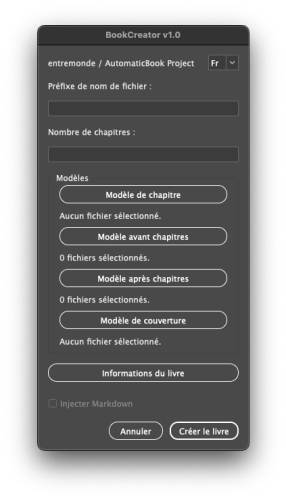 In a traditional publishing workflow, creating a book involves many tedious and error-prone manual steps. For each new project, the editor or designer must juggle multiple InDesign template files: the cover, title pages, chapters, appendices. For each file, they must manually insert or modify the book’s information: title, subtitle, author, publisher, print date, ISBN, copyright. Often, the text is imported from unreliable Word documents.
These manual entries, repeated file by file, multiply the risk of mistakes: omissions, typos, inconsistencies between files, barcode errors, outdated legal mentions. Added to this are technical tasks like generating a correct EAN13 barcode from the ISBN, checking page numbers, and synchronizing headers.
Each step may seem minor, but the cumulative burden eats up time and makes the process vulnerable to human error. For a publisher managing multiple titles per year, standardizing, automating, and securing these steps becomes essential for efficiency, reliability, and peace of mind.
General Operation
 BookCreator is an advanced script for Adobe InDesign designed to automate the entire book creation process from templates.
Starting from a standardized metadata file (YAML, the same format used with Pandoc for epub generation), it allows you to:
- Automatically generate a complete .indb (InDesign book) and cover
- Create all necessary InDesign documents (.indd) from template files
- Insert metadata (title, author, publisher, ISBN, print date, etc.) into the title pages, headers, and book sections
- Generate and insert a valid EAN13 barcode from the provided ISBN
- Automatically inject chapter content
- Prepare a fully structured project, ready for fine-tuning and final layout
In just a few minutes, a complete and clean project is generated — no repetitive manual entries, no typos, and fully compliant with your editorial layout. The book is ready for final proofreading and layout.
Usage
Step 1 — Prepare your files
- Create a YAML file manually or from the script, containing all book information: title, author, ISBN, publisher, date, and list of text files in Markdown (input-files).
- Organize your InDesign templates (.indd) in an accessible folder.
Step 2 — Launch BookCreator
- Run the BookCreator.jsx script from your Scripts panel in InDesign.
Step 3 — Fill or verify information
- If a YAML file is imported, BookCreator loads the metadata automatically.
- Otherwise, you can enter the data manually via the built-in interface.
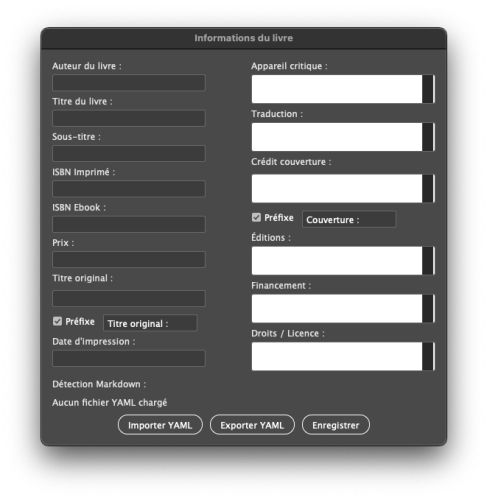
- The “Book Information” button opens a detailed window to configure all metadata.
Step 4 — Automatic generation
- BookCreator creates the required .indd documents.
- It inserts data into the correct text frames (title pages, chapter headings, page headers), replacing placeholders in your templates.
- It generates a vector barcode for the ISBN if needed.
Step 5 — Content injection
- BookCreator can automatically inject the content from Markdown text files into chapters.
- The script intelligently detects which Markdown files correspond to which chapters.
Placeholders and Variables
To allow BookCreator to replace book information in your templates, insert the following specific placeholders into your InDesign documents:
| Placeholder | Description |
|---|---|
| «Book_Author» | Book author’s name |
| «Book_Title» | Book title |
| «Subtitle» | Subtitle |
| «ISBN_Print» | ISBN for the printed edition |
| «ISBN_Ebook» | ISBN for the ebook edition |
| «Critical_Apparatus» | Critical apparatus |
| «Translation» | Translation |
| «Original_Title» | Original title (with optional prefix) |
| «Cover_Credit» | Cover credit (with optional prefix) |
| «Print_Date» | Print date |
| «Editions» | Editions |
| «Funding» | Funding |
| «Rights» | Rights and licenses |
| «Price» | Price |
| «Document_Title» | Current document title (extracted from Markdown content) |
| «EAN13_Print» | Placeholder for EAN13 barcode for print ISBN |
| «EAN13_Ebook» | Placeholder for EAN13 barcode for ebook ISBN |
Markdown Detection and Injection
BookCreator includes a smart system to locate and inject the appropriate Markdown content into each document:
- YAML Configuration: In your YAML file, define an `input-files` array listing all your Markdown files.
- Smart Search: BookCreator searches for the files in several potential locations:
- Folders like `text`, `Text`, `texte`, `Textes`, `md`, `markdown`…
- Project folder and configuration folder
- Matching Algorithm: The script uses a scoring system to determine the best match between each Markdown file and each document, analyzing:
- Descriptive parts of filenames
- Keywords like “chapter”, “introduction”, “conclusion”
- Numeric correspondences
- Target Frame: The Markdown content is injected into:
- A text frame labeled “content” or “contenu”
- Or the first text frame in the document if none are labeled
- Title Extraction: BookCreator can automatically extract the first H1 title from the Markdown and use it to replace «Document_Title» in the document.
Book Structure
The script supports multiple types of documents to create a complete book:
- Chapter template: Used for each chapter of the book
- Pre-chapter templates: Front matter (title page, copyright, preface…)
- Post-chapter templates: Back matter (index, bibliography, colophon…)
- Cover template: For the book cover
YAML File Format
BookCreator uses a standard YAML format, compatible with Pandoc:
---
title: Book Title
subtitle: Subtitle
author: Author Name
date: "2023"
isbn-print: 978-2-9565793-4-7
isbn-ebook: 978-2-9565793-5-4
rights: "CC BY-NC-SA 4.0"
originalTitle: Original Title
coverCredit: Artist Name
critical: Editor Notes
translation: Translator Name
editions: Publisher Name
funding: Funding Information
price: €19.90
input-files:
  - 01-introduction.md
  - 02-chapter1.md
  - 03-chapter2.md
  - 04-conclusion.md
---
The `input-files` field is particularly important for Markdown content injection.
Editorial Workflow Optimization
BookCreator integrates perfectly into a modern editorial workflow:
- Uses Markdown files for content (compatible with Pandoc, GitHub, etc.)
- Standard YAML format for metadata (reusable for EPUB, PDF export…)
- Automates repetitive and error-prone tasks
- Preserves InDesign styles for full typographic control
- Built-in bilingual support for international teams
This script is a complete solution to simplify and secure publishing production, combining the advantages of modern digital workflows with the layout power of InDesign.
Advanced Tips
Text Overflow
The PageOverflow module automatically handles text overflow by:
- Intelligently detecting overflowing frames
- Adding pages according to layout parameters (left/right pages)
- Creating linked text frames with proper margins
- Ensuring text continuity throughout the document
Optional Fields
Some fields are completely removed if left empty:
- «Critical_Apparatus»
- «Translation»
- «Original_Title»
- «Cover_Credit»
- «Editions»
- «Funding»
This feature allows the layout to adapt automatically without empty gaps.
Pandoc Compatibility
The YAML metadata used by BookCreator is fully compatible with Pandoc, enabling a multiformat workflow:
- Create one YAML file for all your needs
- Reuse the same metadata for PDF, EPUB, and HTML generation
- Maintain perfect consistency across all formats
International Support
BookCreator is fully internationalized with support for French and English:
- Automatic detection of InDesign interface language
- Dropdown menu to switch language manually
- Full translations for all UI elements and messages
- Support for localized date formats and conventions
ISBN and Barcode Management
BookCreator offers full ISBN management:
- Validation: Automatic format check and control digit calculation
- EAN13 Generation: Automatic conversion of ISBNs into valid EAN13 barcodes
- Vector Output: Creates vector barcodes directly in InDesign, no external images needed
Technical Architecture
BookCreator is modularly structured, using a namespace- and class-based architecture. Main script components include:
Core Modules
- YAMLParser: A custom YAML parser for processing metadata files
- Parses and generates YAML files with support for nested structures
- Handles lists, multiline strings, scalar values, and data types
- I18n: Internationalization module for managing French and English translations
- Automatically detects InDesign interface language
- Manages translations via the `__()` function with variable substitution
- TextUtils: Utilities for text formatting and handling
- Processes `<br>` tags and trailing spaces
- PageOverflow: Automatic text overflow management
- Detects overflowing frames and adds pages as needed
- Creates and links new text frames with proper margins
- Book: Main class handling book creation
- Validates book data
- Generates documents from templates
- Injects Markdown content
- LogManager: Centralized error and message handling
- BookUtils: Specialized utility modules:
- ISBN: Validation and EAN13 barcode generation
- Document: InDesign document manipulation, variables, placeholders
- File: YAML and Markdown file operations
- UI: User interfaces for configuration and settings